Connect ERP systems, finance ledgers, CRM workflows, unstructured documents, and real-time
analytics into governed, automated processes that eliminate human error while preserving approvals and
auditability.
Microsoft Power AutomateFabric Data ActivatorHuman-in-the-Loop Governance
80% FasterReduction in routine business process cycle times and transaction latency.
0 Keying ErrorsAutomated data extraction and validation eliminating manual spreadsheet transcription.
100% AuditImmutable execution logs recording every input, rule, approval, and downstream API call.
Human GateControlled exception routing ensuring high-value thresholds require authorized sign-off.
Business-Led Automation
Automate the end-to-end process—not just isolated
tasks.
Most enterprise automation initiatives fail when they deploy fragile desktop macros that
break whenever an interface changes. Real business value requires integrating data, decisions, and approvals
into a monitored, production-grade service.
DAVIZ Solutions architects intelligent automation across Microsoft Power Automate, Fabric
Reflex (Data Activator), Azure Logic Apps, and cognitive Document AI. Standard transactions flow through
automatically, while complex exceptions are routed directly to authorized stakeholders with full contextual
evidence.
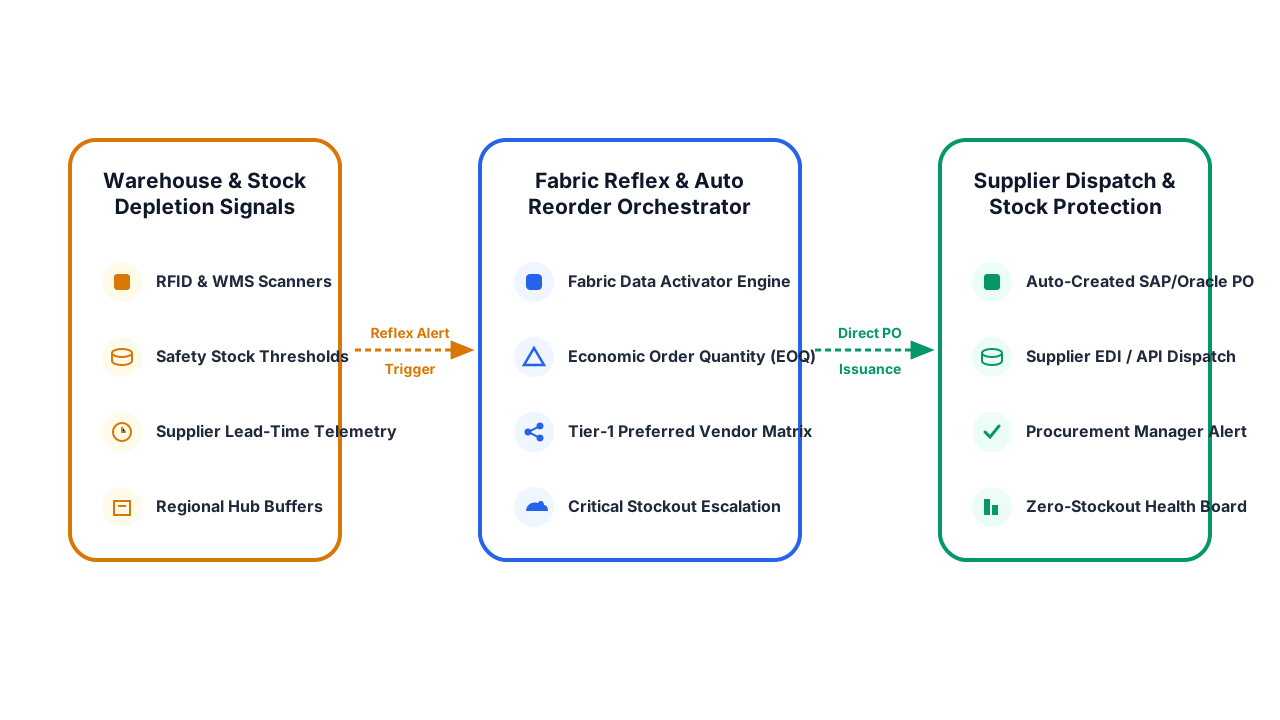
Automatically trigger operational actions directly from data changes. When inventory drops below safety
stock or customer churn risk exceeds 70%, Fabric Data Activator dispatches purchase orders or customer
success alerts instantly.
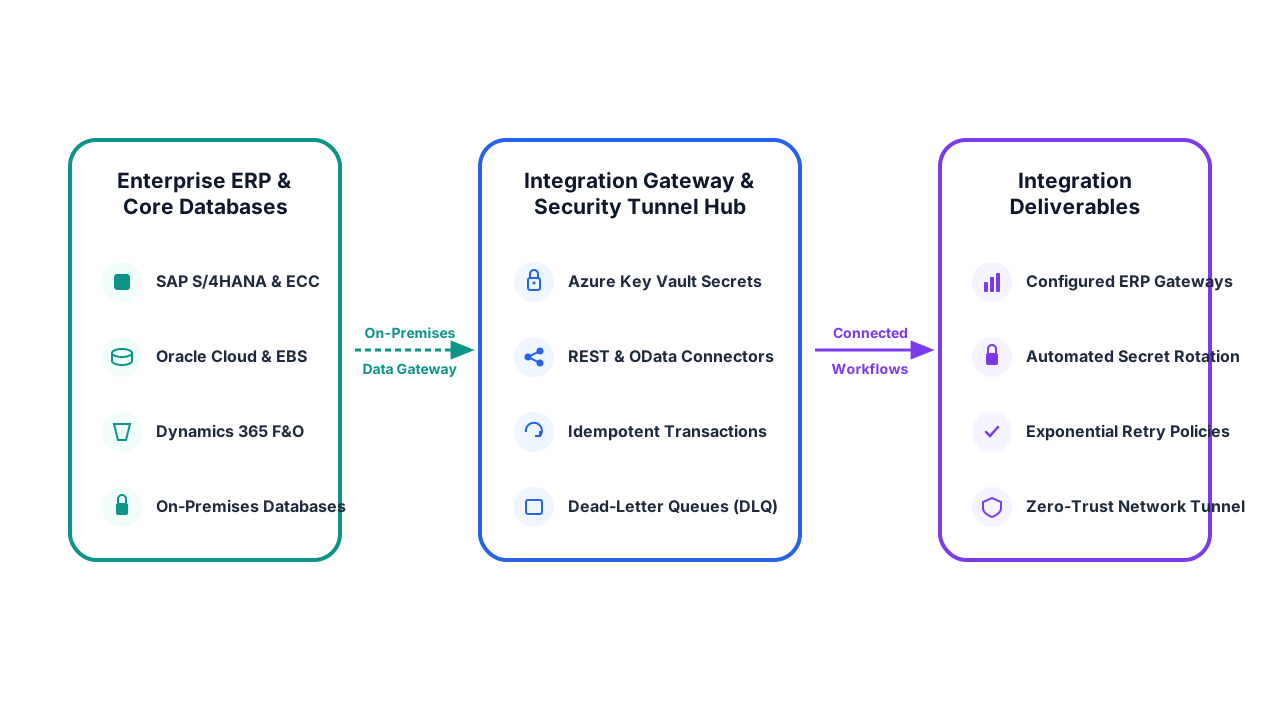
Synchronize financial postings, vendor invoices, purchase orders, and sales orders across SAP, Oracle,
Microsoft Dynamics 365, and Salesforce using robust API endpoints with automated retry and rollback
safety.
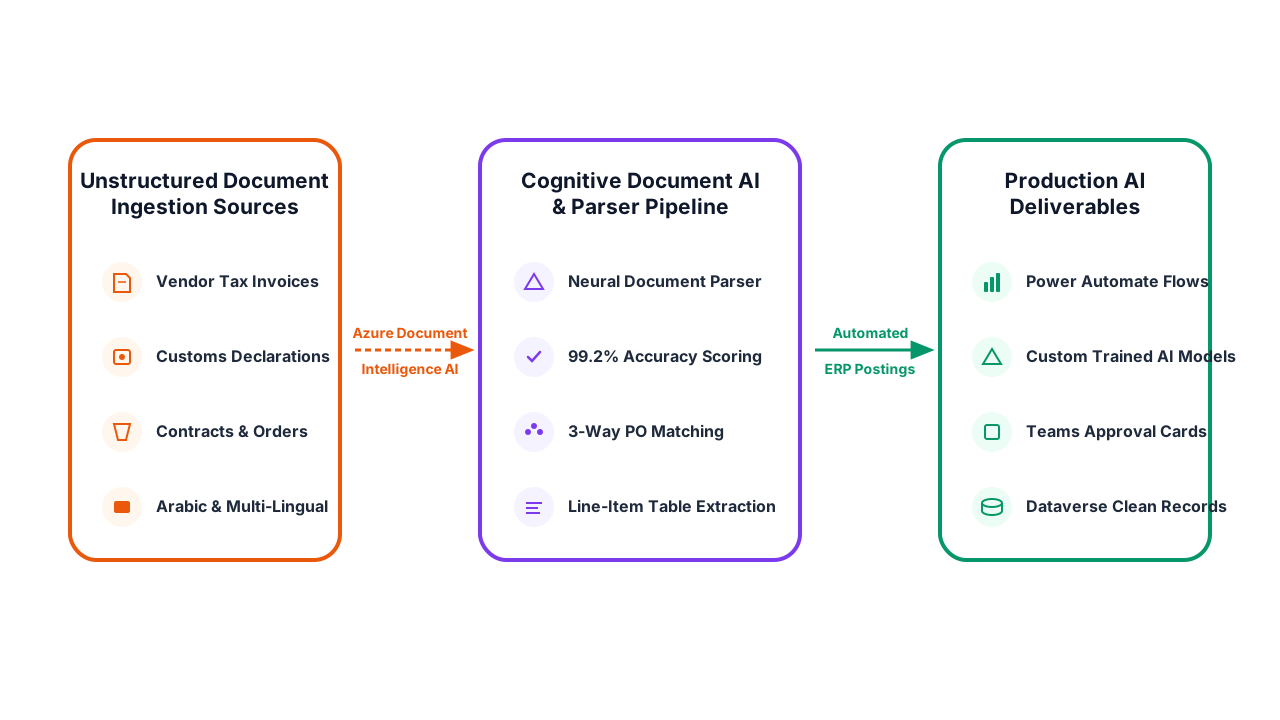
Extract line-item data from PDF invoices, bills of lading, customs clearance documents, and vendor
receipts with AI models that match extracted totals against ERP purchase orders with 99%+ accuracy.
Provide department heads and CFOs with instant interactive approval cards inside Microsoft Teams and
Outlook. Managers review transaction context, approve variances, or reject requests with one click.
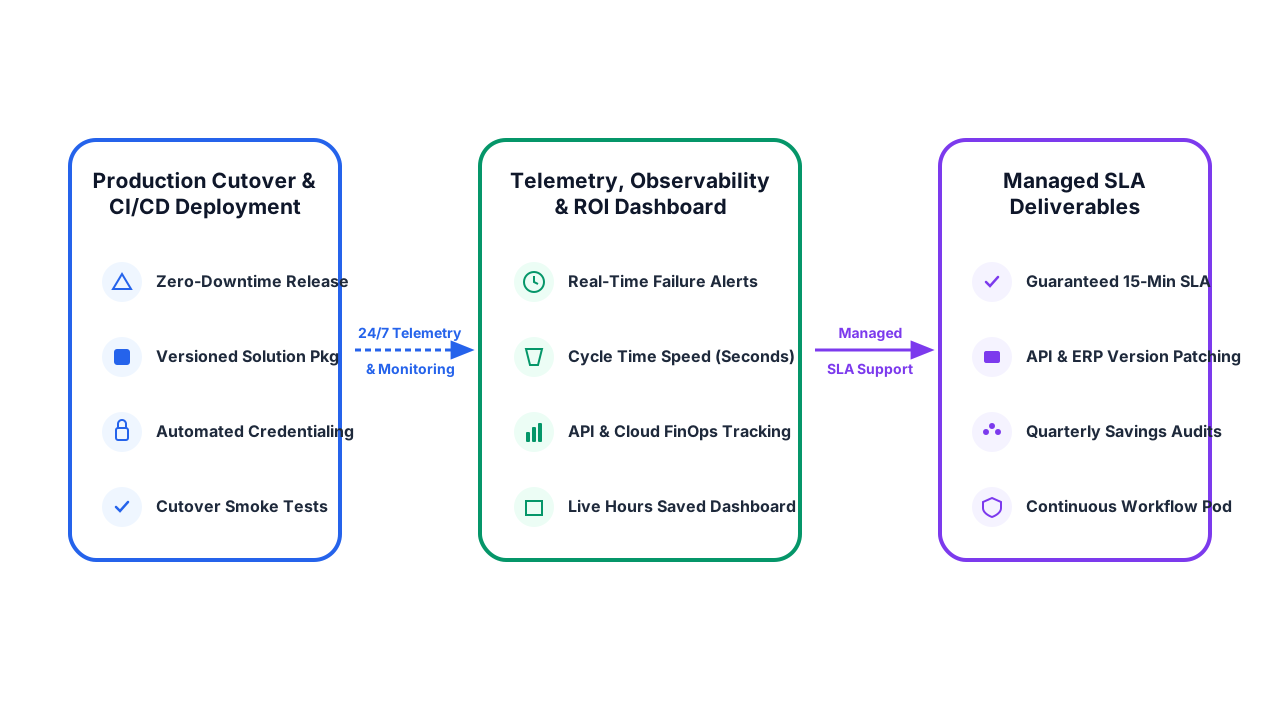
Monitor workflow volumes, execution durations, bottleneck delays, and failed API retries in centralized
dashboards with automated escalation notifications if an approval is stuck.
High-Value Workflows
Target Operational Friction With Measurable Enterprise
ROI.
We prioritize automations that eliminate heavy manual labor, reduce costly transaction
errors, and accelerate core business cycle times.
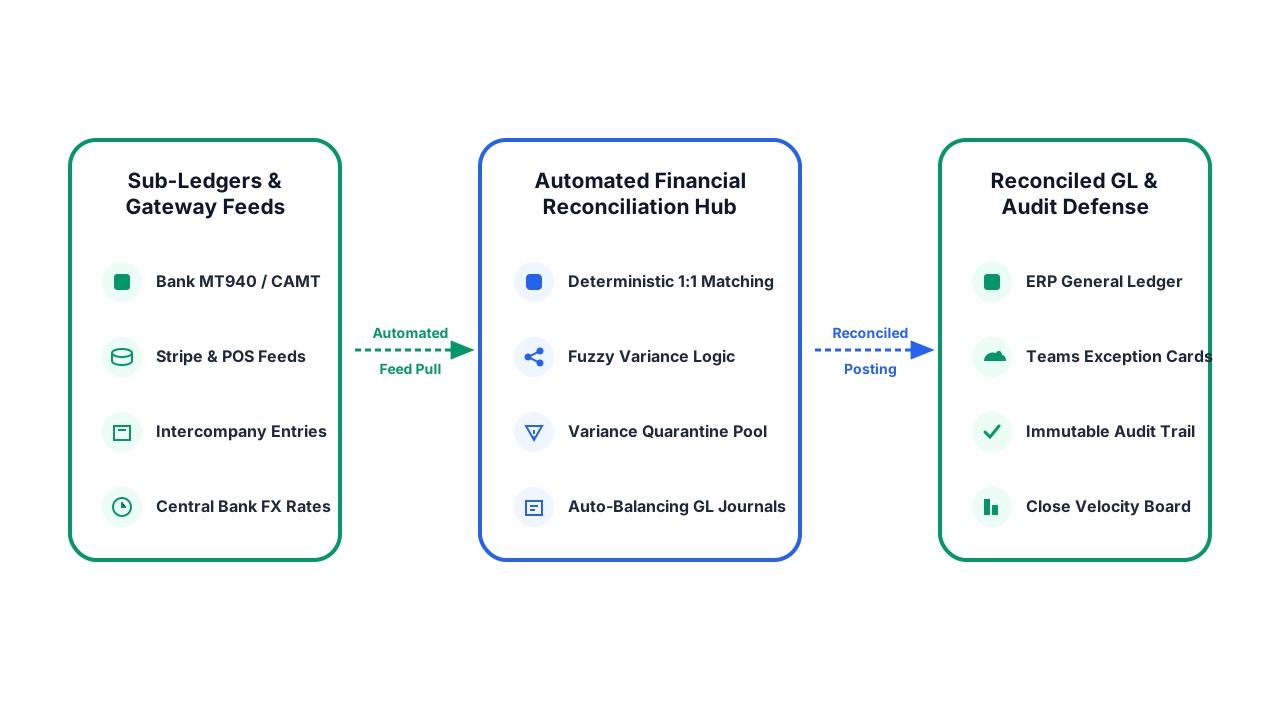
Cut days off your financial close cycle. We build automated reconciliation workflows that match bank
statements, point-of-sale feeds, payment gateways (Stripe, Network International), and intercompany
balances against core ERP general ledgers. Matched transactions reconcile automatically; discrepancies
are packaged with full audit evidence for review.
Bank & Gateway ReconciliationIntercompany Balance MatchingClose Checklist TrackingAudit-Ready Journal Evidence
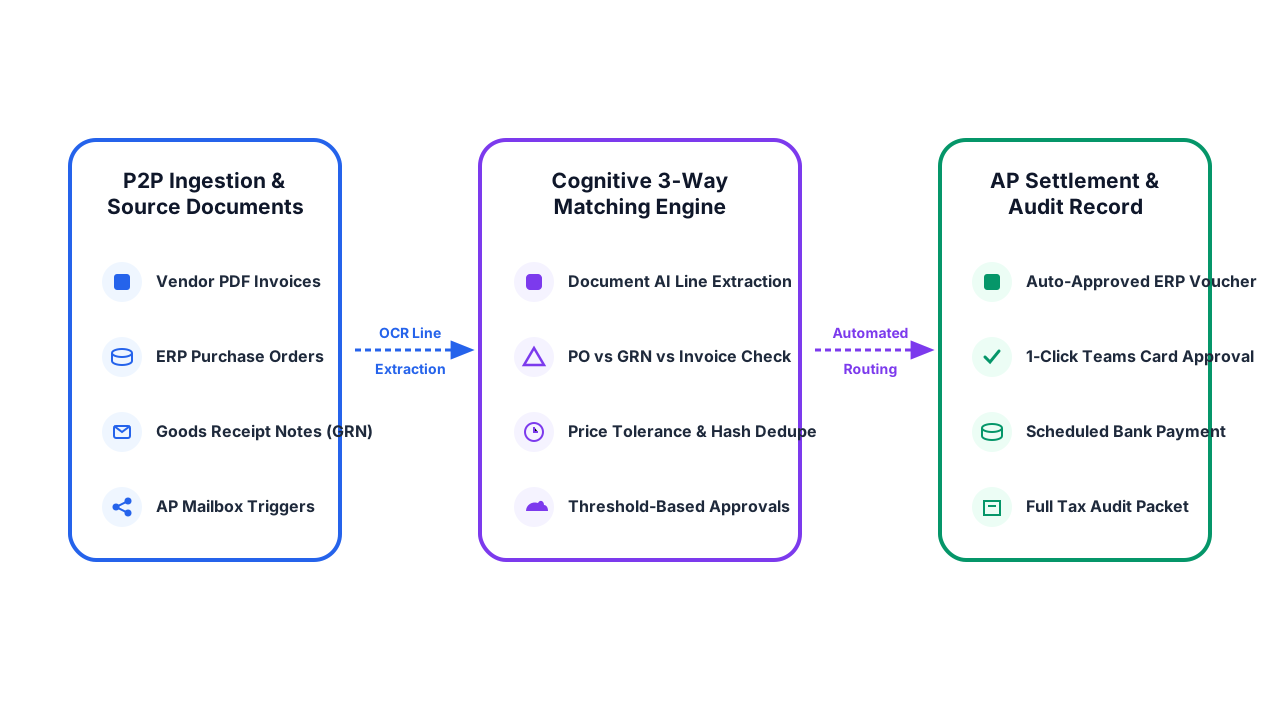
Automate accounts payable from purchase requisition to invoice settlement. Incoming vendor invoices
are extracted using AI OCR, cross-verified against purchase orders and warehouse goods receipts (3-way
match), and routed to approvers via Teams based on budget thresholds before being posted to the ERP.
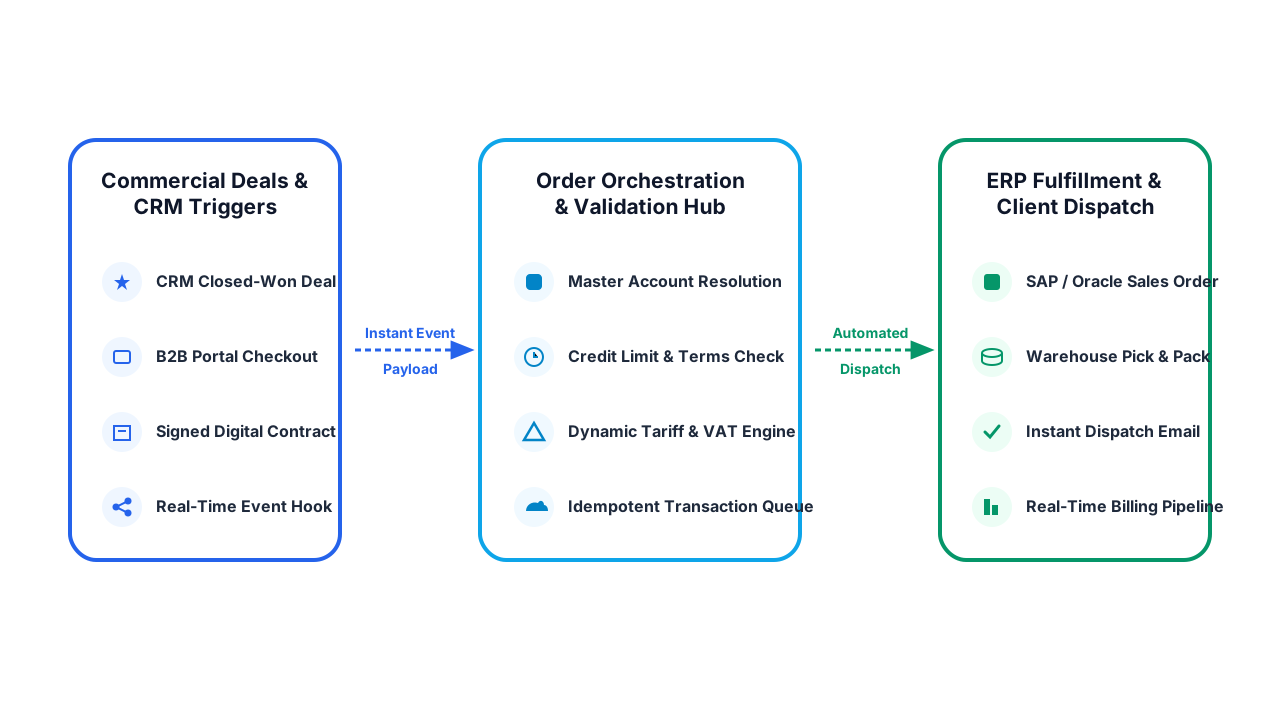
Eliminate manual double-entry between CRM and ERP. When a deal closes in Salesforce or Dynamics 365,
automated workflows create customer records, generate sales orders, calculate shipping tariffs, check
credit limits, and trigger warehouse dispatch with real-time tracking numbers returned to the client.
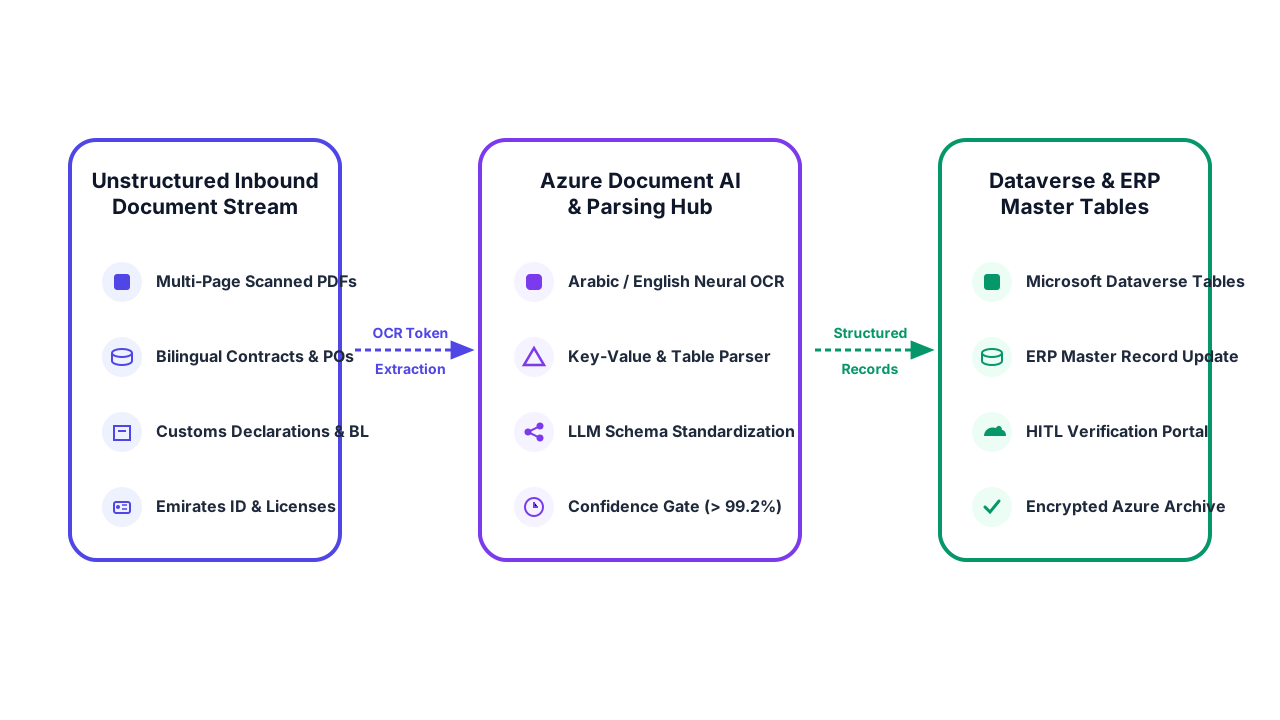
Transform mountains of physical and scanned paperwork into clean, structured digital records. Using
Azure AI Document Intelligence and custom LLM parsers, we automatically classify contracts, tax forms,
customs declarations, trade licenses, and Emirates IDs, populating your master databases with zero
manual typing.
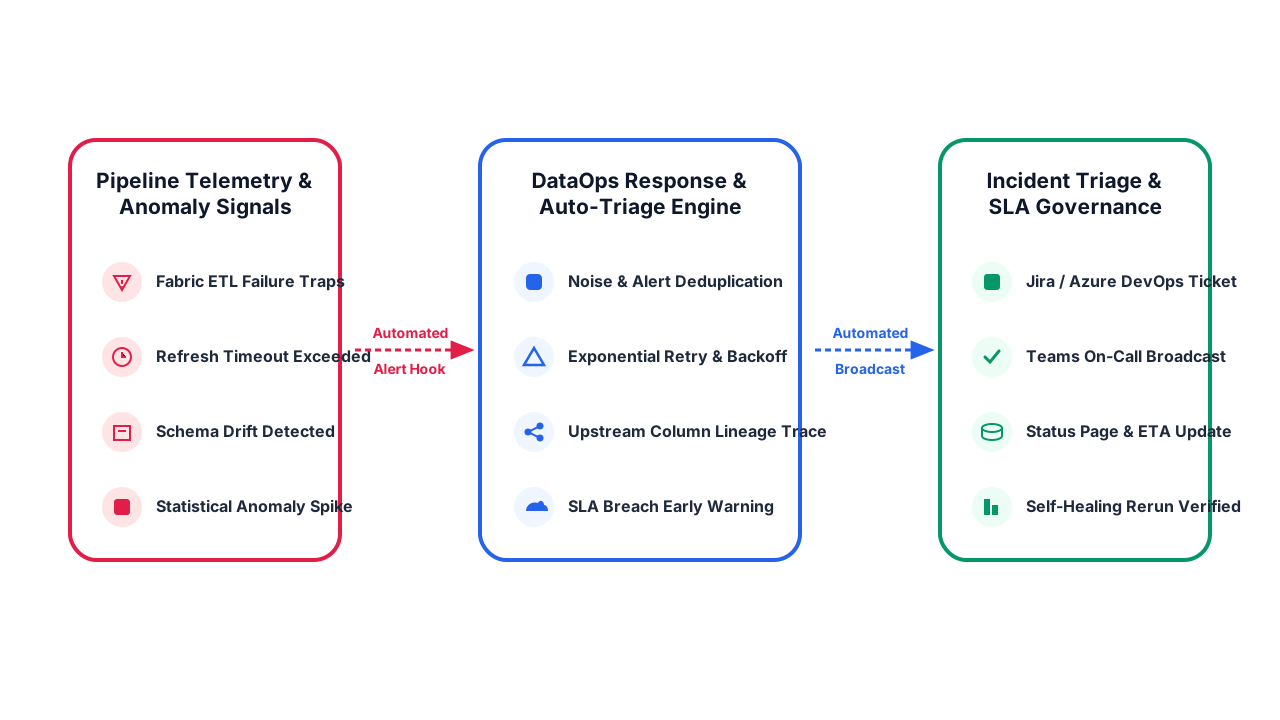
Keep your reporting ecosystem healthy without manual monitoring. When an ETL pipeline fails, a
dataset refresh exceeds timeout thresholds, or data anomaly detection identifies revenue drops,
automated workflows log incident tickets, notify engineers via Teams, and notify business users with
clear ETA updates.
Our 6-Stage Process Automation & AI Integration Lifecycle.
A disciplined methodology that prioritizes high-ROI use cases, establishes bulletproof controls, and delivers measurable efficiency.
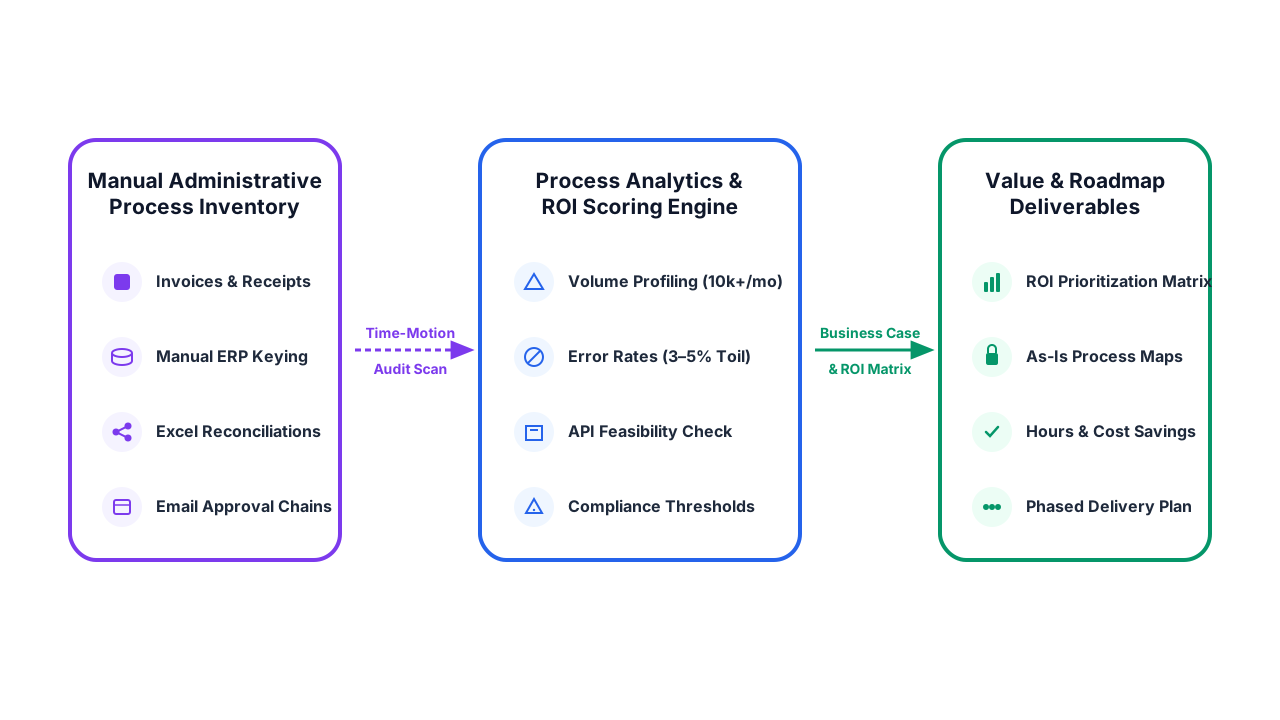
Stage 01: Value Assessment
Process Discovery & ROI Feasibility Audit
We conduct workshops with department heads to inventory repetitive manual workflows. We evaluate transaction volumes, error rates, system interfaces, and calculate the concrete hours and cost saved per automation.
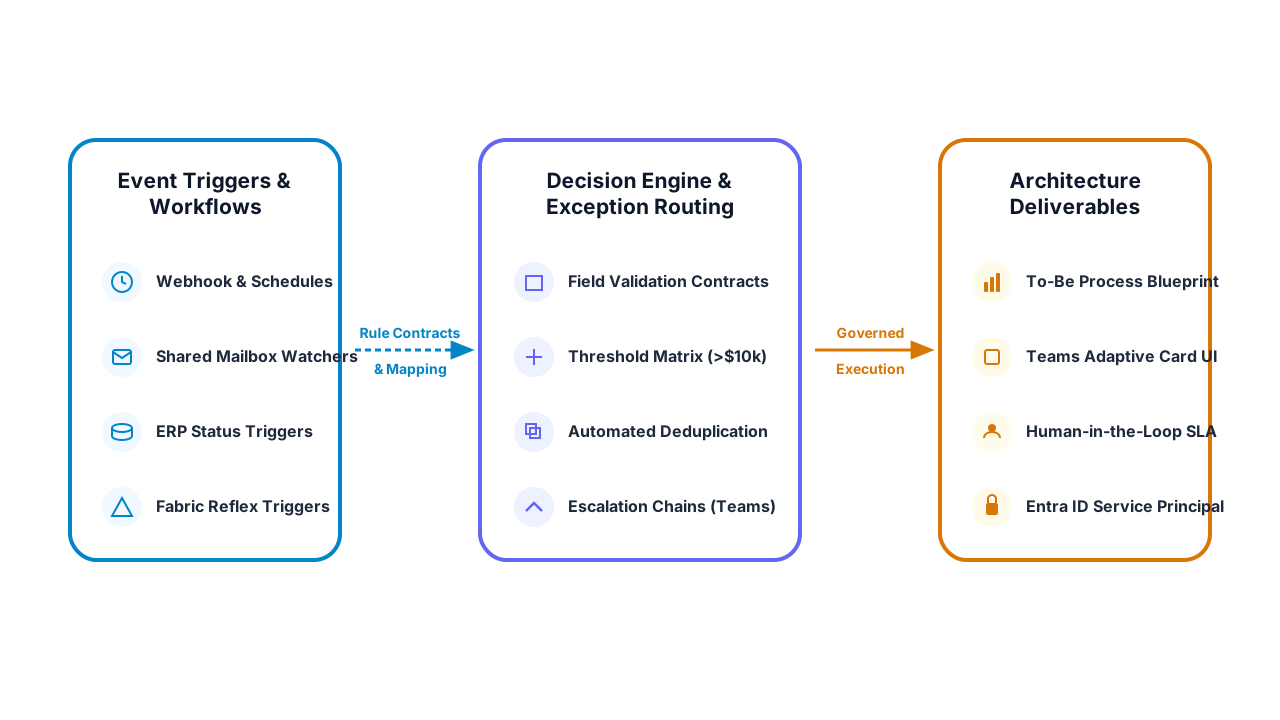
We map the To-Be workflow process: API endpoints, trigger conditions, validation rules, exception thresholds, and fallback human approval chains inside Microsoft Teams and email.
We establish secure connectivity between cloud services and on-premises ERP systems using Power Automate connectors, Azure Logic Apps, REST APIs, and On-Premises Data Gateways.
We construct the automated workflow logic, train Document Intelligence AI models on your actual invoices or contracts, and build adaptive approval cards inside Microsoft Teams.
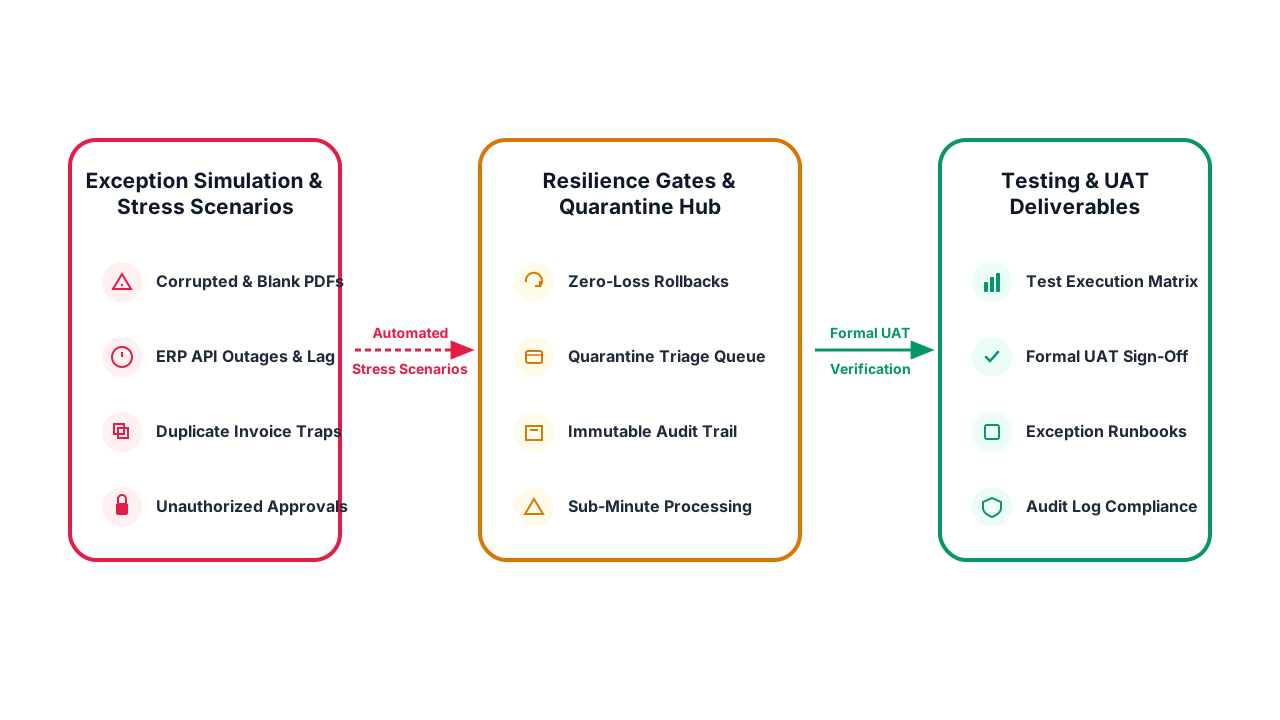
We simulate real-world failure conditions: API timeouts, duplicate invoices, corrupted PDFs, and unauthorized approval attempts, ensuring the workflow fails gracefully and logs full audit trails.
We deploy the automated workflows to production, establish real-time execution dashboards tracking cycle time and savings, and provide ongoing managed engineering support.
Eliminate repetitive manual tasks and accelerate your operations.
Book a confidential automation discovery session with our UAE specialists. We will analyze your processes,
identify bottlenecks, and present a practical ROI roadmap.
Traditional Robotic Process Automation (RPA) mimics human screen clicks and keystrokes.
It works well for legacy desktop screens, but is brittle—breaking whenever an app button shifts.
Intelligent Automation (IA) uses secure API integrations, AI document intelligence,
natural language models, and event triggers (like Microsoft Fabric Reflex). It understands unstructured
data, validates business rules, and executes transactions via supported system interfaces with far greater
reliability.
We enforce strict Human-in-the-Loop governance. AI is utilized for parsing, classifying,
extracting data, and recommending actions. Any transaction exceeding defined financial thresholds,
exhibiting low confidence scores, or touching sensitive ledger accounts requires explicit human
authorization via secure Microsoft Teams or email approval cards before commits occur.
Yes. Using Microsoft On-Premises Data Gateways and Azure Hybrid Connections, Power Automate and Logic
Apps securely communicate with internal on-premises SQL Server databases, SAP systems, file shares, and
local web services through encrypted outbound HTTPS tunnels without opening vulnerable inbound firewall
ports.
Our workflows are engineered with enterprise error handling. We configure exponential backoff retry
policies, dead-letter queues, and automated incident alerting. If an ERP system is temporarily unreachable
during maintenance, the transaction payload is safely queued and retried automatically once connectivity
is restored, preventing any data loss.
A focused single workflow (such as automated vendor invoice extraction or customer lead routing)
typically deploys in 2 to 4 weeks. Multi-departmental automation suites with complex ERP
integrations, multiple approval stages, and AI processing typically launch within 6 to 10
weeks.
Basic cloud flows connecting Microsoft 365 services are included with standard M365 enterprise licenses.
Workflows connecting premium enterprise connectors (SAP, Oracle, Salesforce), desktop RPA bots, or AI
Document Intelligence utilize Power Automate Process or User licenses. We assist you in selecting the most
cost-effective licensing model to avoid unnecessary cloud expenditure.